✦ Free · Chrome · 100% local

Draw & annotate notes on any webpage

A transparent, Excalidraw-style sketch canvas on top of any website. Handwrite over what you're reading — notes pin to the content, scroll with the page, and save locally per URL.
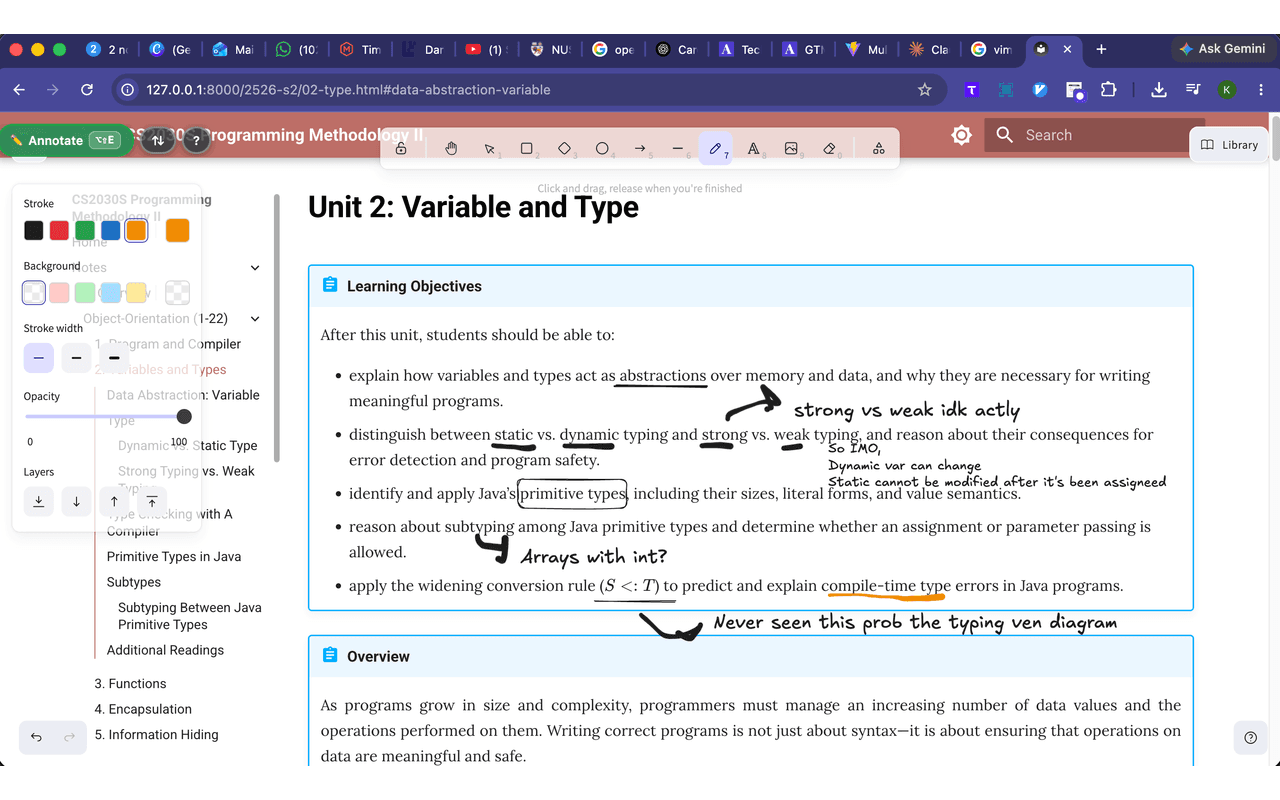
Handwritten notes, arrows and underlines drawn over a CS2030 lecture-notes webpage
scrolls with
the page →
your real notes,
saved here
made for margin-scribblers ↴

Who it's for

📚 Students🔬 Researchers🧠 Self-learners💻 Devs reading docs

Anyone who marks up what they read — arrows, question marks, "wait, why?" — right on the page.

What you can do

Freehand marker, shapes, arrows and text — right on the live page.

✎ Sketch anywhere
Draw over any website — freehand, arrows, shapes, text.
↕ Scrolls with it
Notes pin to the content, not the screen.
💾 Autosaves
Saved per URL, locally. Reappears on revisit — no account.
🌐 Everywhere
Works on strict sites like GitHub. Offline too.

How it's different

vs. highlighters
They only mark text. Draw arrows, diagrams and handwriting anywhere.
vs. Excalidraw
The excalidraw chrome extension that draws on the live page — not a blank canvas.
vs. screenshots
Notes stay attached to the living page and come back on revisit. Keep browsing.
the story

Built while cramming for NUS CS2030 (Programming Methodology II). I wanted to scribble on lecture notes in the browser the way I do on paper — arrows, question marks, "wait, why?" — so I made a marker that lives on top of the web.

FAQ

How do I draw on a webpage in Chrome?
Install Overlay Notes, open the grab pill on any page, and draw directly over the content with the marker, shapes, arrows or text tools.
Can I annotate a website and save my notes?
Yes. Notes save automatically per URL in your browser and reappear when you return to the page.
Is there an Excalidraw extension for Chrome?
Overlay Notes is an Excalidraw-style sketch canvas that draws on the live page instead of a separate blank canvas.
Do my notes stay on the page when I scroll?
Yes. Annotations pin to the content, not the screen, so they scroll with the page.
Are my notes private or stored anywhere online?
Everything is stored locally in your browser. Nothing is collected, transmitted, sold, or shared.
Does it work offline?
Yes. Overlay Notes runs entirely in your browser and works offline.
☕ support

Keep the marker uncapped

Overlay Notes is free and always will be— no accounts, no ads, nothing tracked. I'm a solo developer covering the hosting and build costs myself. If it's saved you some scribbling, a small tip keeps it alive and growing.

every tip = one more late-night feature ↴
$3$8$20or whatever!